Build a CNN from Scratch Using Python and NumPy
Building a Convolutional Neural Network (CNN)
Deep learning frameworks like TensorFlow and PyTorch make building CNNs extremely easy — sometimes too easy.
Because most operations happen behind the scenes, beginners often miss the core intuition of how convolution, pooling, and feature extraction truly work.
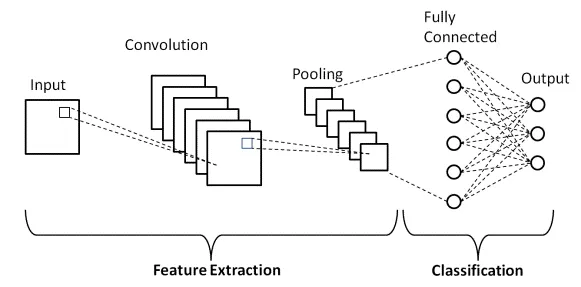
In this blog, we will build a complete forward pass of a CNN from scratch using only Python and NumPy.
No TensorFlow, no PyTorch — just raw mathematical operations. I have tried to make it as simple as possible, no complex words, just basic CNN and its anagrams.
By the end, you’ll understand:
- How convolution filters slide across images
- How ReLU introduces non-linearity
- How max pooling shrinks spatial dimensions
- How flattening and dense layers work
- How softmax generates final class probabilities
What Does a CNN Actually Do?
A CNN takes an image, extracts features, and predicts its class.
The core idea is:
Image → Convolution → ReLU → Pooling → Flatten → Fully Connected → Softmax
Each layer transforms the image into a more meaningful representation.
🧱 Step 1: Convolution Layer
A convolution layer applies small filters (e.g., 3×3) over the image to detect patterns like edges, curves, textures, etc.
Python Implementation:
def conv_forward(image, conv_filter):
    filter_size = conv_filter.shape[1]
    h, w = image.shape
    output_size = h - filter_size + 1
    output = np.zeros((output_size, output_size))

    for i in range(output_size):
        for j in range(output_size):
            output[i][j] = np.sum(image[i:i+filter_size, j:j+filter_size] * conv_filter)

    return output
⚡ Step 2: ReLU Activation
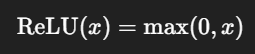
ReLU (Rectified Linear Unit) introduces non-linearity.
Formula:
def relu(x):
    return np.maximum(0, x)
🧩 Step 3: Max Pooling
Pooling reduces image size while keeping important features.
def maxpool(x, size=2, stride=2):
    h, w = x.shape
    output_h = h // size
    output_w = w // size

    output = np.zeros((output_h, output_w))

    for i in range(0, h, stride):
        for j in range(0, w, stride):
            output[i//stride][j//stride] = np.max(x[i:i+size, j:j+size])

    return output
📉 Step 4: Flatten Layer
Flattening converts the 2D feature map into a 1D vector.
def flatten(x):
    return x.reshape(-1, 1)
🔗 Step 5: Fully Connected Layer
This layer learns the final decision boundary.
def dense_forward(x, weights, bias):
    return np.dot(weights, x) + bias
🎯 Step 6: Softmax Output
Softmax turns raw scores into probabilities:
def softmax(logits):
    e = np.exp(logits - np.max(logits))
    return e / np.sum(e)
🚀 Putting It All Together (Full Forward Pass)
def cnn_forward(image, conv_filter, fc_weights, fc_bias):
    # 1. Convolution
    x = conv_forward(image, conv_filter)

    # 2. ReLU
    x = relu(x)

    # 3. Max Pooling
    x = maxpool(x)

    # 4. Flatten
    x = flatten(x)

    # 5. Fully Connected
    logits = dense_forward(x, fc_weights, fc_bias)

    # 6. Softmax
    probs = softmax(logits)

    return probs
🧪 Test Run Example
import numpy as np

image = np.random.randn(28, 28)
conv_filter = np.random.randn(3, 3)
fc_weights = np.random.randn(10, 169)
fc_bias = np.random.randn(10, 1)

output = cnn_forward(image, conv_filter, fc_weights, fc_bias)
print("Class probabilities:\n", output)
You now have a fully functional CNN forward pass built entirely with NumPy.
Conclusion
Building a CNN from scratch demystifies the inner workings of deep learning models.
By manually implementing convolution, activation functions, pooling, and fully connected layers, we gain a much clearer understanding of:
- How CNNs extract features
- How spatial transformations occur
- How dense layers compute final predictions
- How softmax translates scores into probabilities
This foundational knowledge helps you become a better deep learning engineer — even when using high-level frameworks.
📬 Want to connect or collaborate? Head over to the Contact page or find me on GitHub or LinkedIn
About The Author
